LIVELEAD · AGENT NOTIFICATIONS
Your calls. Your choice of texts.
LiveLead is operated by DIGITL INC. DBA CLICKFLOW. Agents can choose automated SMS notifications about incoming calls, caller-provided qualification details and transfer outcomes for their workspace.
How to opt in
- Sign in to your invited LiveLead workspace using your verified Google or Apple email, when available.
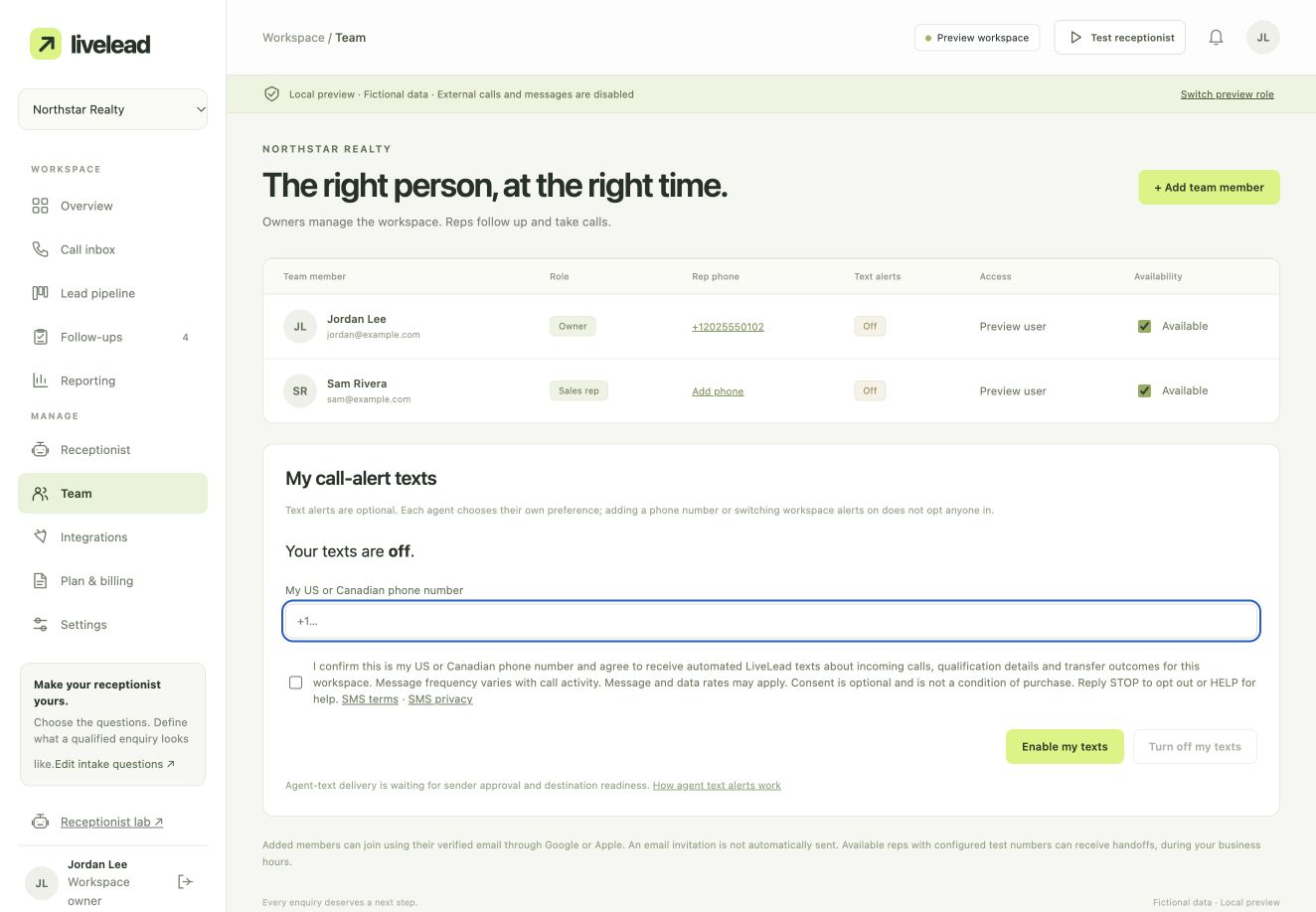
- Open Team → My call-alert texts and enter your own US or Canadian phone number.
- Read the consent disclosure, SMS terms and SMS privacy information. The consent checkbox starts unchecked.
- Choose the checkbox and select Enable my texts. We record your signed-in account, number, time and the disclosure you accepted.
Adding a team member, entering a fallback number or enabling the workspace alert switch does not subscribe an agent. Each agent makes their own choice.
Example of the opt-in screen
This example uses fictional people and a demonstration workspace. It shows the real opt-in form with its checkbox unchecked; it is not evidence that anyone has subscribed.
The consent you will see
I confirm this is my US or Canadian phone number and agree to receive automated LiveLead texts about incoming calls, qualification details and transfer outcomes for this workspace. Message frequency varies with call activity. Message and data rates may apply. Consent is optional and is not a condition of purchase. Reply STOP to opt out or HELP for help.
Turn texts off
Select Turn off my texts in Team, or reply STOP to the sending number. Reply HELP for support information. After a text opt-out, reply START to remove the carrier block, then choose to enable alerts again in LiveLead. START alone does not subscribe you again in the app.
Delivery requires an approved messaging sender, enabled destination permissions and enabled service. US and Canadian delivery have separate carrier requirements. Choosing alerts does not activate calling or guarantee text delivery. Voice handoffs can continue without SMS alerts.